A Self-Service App for Seamless Ordering and Payment

A Self-Service App for Seamless Ordering and Payment

Role

Product Designer

Duration :

3 Days

Overview

Overview

A Javanese restaurant wanted customers to place and pay for their orders on their own, with every order automatically recorded in the POS system. The kitchen team would then receive the order and only need to prepare it before it is finally served directly to the customer’s table.

A Javanese restaurant wanted customers to place and pay for their orders on their own, with every order automatically recorded in the POS system. The kitchen team would then receive the order and only need to prepare it before it is finally served directly to the customer’s table.

User Jobs to Be Done

User Jobs to Be Done

  1. Company / Restaurant Owner

    • Increase profit by improving customer satisfaction: no more long lines, fewer drop-offs, and faster order intake.

    • Reduce human error by minimizing staff involvement in order taking.

    • Improve staff efficiency and productivity.

    • Create a better dining environment by keeping the restaurant neat without long queues.

  2. Customer / Visitor

    • Order food quickly.

    • Get food served faster.

    • Receive the right order without mistakes.

    • Enjoy a comfortable dining experience (beyond just food taste/quality).


Research


Research

To understand ordering habits, I conducted interviews with 5 users who had tried self-ordering at different Indonesian (nusantara) restaurants.

User Journey

User behavior when ordering food at a traditional Indonesian (nusantara) restaurant:

Interviews showed differences between fast food and nusantara dining behaviors:

  1. Fast Food Restaurants

    • Arrival: order at the counter, then find a seat.

    • Ordering: usually familiar with the menu, less need to ask.

    • After Order: self-service condiments, return to counter if needed.

  2. Nusantara Restaurants

    • Arrival: directed to a seat, then call or wait for waiter to order.

    • Ordering: even if familiar with the menu, often ask questions (presentation differs by place).

    • After Order: waiters bring condiments to the table.


Ideation & Solutions

  1. Audience

There are two main customer types in the ordering process:

  1. Dine-in customers.

  2. Takeaway customers:

    • Dine in first, then order extra for takeaway.

    • Order only for takeaway.

B. Ideation Process

I used the user journey to break down ideas.


  1. At the Restaurant – Key considerations :


Step 1 : Device Options

Option 1 – Screen Installation

  • Pros: Supports debit/credit card payment; visible and easy to use.

  • Cons: High operational cost; requires stable internet; customers still queue at the screen; staff must search tables; less flexible to update.


Option 2 – Smartphone

  • Pros: Lower cost; customers order directly at their table; table number automatically goes to POS; open/close bill possible.

  • Cons: Barcode can be moved/damaged; harder to use debit/cash payments.


Decision: Chose smartphone with QR/barcode on mobile web. It’s device-friendly (no app install needed) and works across Android/iOS.


Step 2 : Barcode Placement

Option 1 – Unique Barcode per Table

  • Pros: No need to input table number; faster and easier ordering; fewer input errors; supports dine-in and takeaway flows.

  • Cons: Requires printing different barcodes per table; only works once customer has a table.


Option 2 – Universal Barcode

  • Pros: Only one barcode for all; customers can scan from anywhere.

  • Cons: Must input table number; risk of wrong input; table numbers may change.


Decision: Chose unique barcodes per table to avoid input errors and speed up the ordering process.

2. Ordering

Based on the user journey, there are several considerations that can help users make decisions.

  1. Ease of finding and choosing menu items

Users want to be “guided” in the process of selecting food. To address this, we considered creating:

Ideation & Solutions

  1. Audience

There are two main customer types in the ordering process:

  1. Dine-in customers.

  2. Takeaway customers:

    • Dine in first, then order extra for takeaway.

    • Order only for takeaway.

B. Ideation Process

I used the user journey to break down ideas.


  1. At the Restaurant – Key considerations :


Step 1 : Device Options

Option 1 – Screen Installation

  • Pros: Supports debit/credit card payment; visible and easy to use.

  • Cons: High operational cost; requires stable internet; customers still queue at the screen; staff must search tables; less flexible to update.


Option 2 – Smartphone

  • Pros: Lower cost; customers order directly at their table; table number automatically goes to POS; open/close bill possible.

  • Cons: Barcode can be moved/damaged; harder to use debit/cash payments.


Decision: Chose smartphone with QR/barcode on mobile web. It’s device-friendly (no app install needed) and works across Android/iOS.


Step 2 : Barcode Placement

Option 1 – Unique Barcode per Table

  • Pros: No need to input table number; faster and easier ordering; fewer input errors; supports dine-in and takeaway flows.

  • Cons: Requires printing different barcodes per table; only works once customer has a table.


Option 2 – Universal Barcode

  • Pros: Only one barcode for all; customers can scan from anywhere.

  • Cons: Must input table number; risk of wrong input; table numbers may change.


Decision: Chose unique barcodes per table to avoid input errors and speed up the ordering process.

2. Ordering

Based on the user journey, there are several considerations that can help users make decisions.

  1. Ease of finding and choosing menu items

Users want to be “guided” in the process of selecting food. To address this, we considered creating:

Ideation :

Recommended Menu


Ideation :

1. Recommended Menu

Reason :


From the user journey, customers often ask waiters about the restaurant’s favorite or signature dishes before ordering. Providing menu recommendations helps customers decide faster and makes the ordering process easier.

Reason :

From the user journey, customers often ask waiters about the restaurant’s favorite or signature dishes before ordering. Providing menu recommendations helps customers decide faster and makes the ordering process easier.

Portion Size & Sharing Info


2. Portion Size & Sharing Info


Reason:

Research showed that users sometimes need information about portion sizes, especially for side dishes. By adding this info, users feel more confident when ordering and the risk of ordering mistakes (different from expectations) can be reduced.

Research showed that users sometimes need information about portion sizes, especially for side dishes. By adding this info, users feel more confident when ordering and the risk of ordering mistakes (different from expectations) can be reduced.


B. Detailed Menu Information

Users need more details about each dish to feel clear and confident when choosing. The clearer the information, the faster they can make decisions.


  1. Provide detailed menu descriptions

Reason :

  • Some customers still ask about condiments included in the dish.

  • From the user journey, customers often ask waiters to re-explain what’s inside a dish before deciding.


  1. Spice level options

Reason :

  • Gives clarity about the level of spiciness.

  • Provides customization based on customer preference.


  1. Custom order options

Reason :

  • Customers can make special requests for their dishes.

  • Customers can leave notes for specific preferences.

  • Provides the kitchen with clear instructions, such as condiments to exclude.


C. Multiple Payment Options

Payment choice is a major factor for users.

  • Enable payment via e-wallets.

  • Smartphone ordering has limitations (not supporting credit or debit cards). As an alternative, virtual accounts can be used.

  • Another limitation is cash payment. Since it cannot be done directly via smartphone, it is recommended to combine it with manual cashier payments if demand is significant.


3. Order Completion

Based on the research, there are several user behaviors that still rely on direct staff service, which need to be considered in a self-service system for nusantara restaurants.

  • Users often ask for condiments or extras (like soy sauce, chili paste, or utensils).

    Since the system is designed for self-service, to keep the dining experience comfortable, commonly requested condiments can be placed directly on tables, or a dedicated station can be provided for customers to take them on their own.

    While staff support cannot be completely removed, combining this setup with the self-order system can significantly reduce the need for direct staff assistance.

  • Additional orders

    Because the system is based on “order and pay immediately”, it only supports a close bill method. This means customers can only place an order if payment has already been made.

    If customers want to add more items, they need to go through the same process again: order first, then pay. This also applies to takeaway orders.

C. User Flow

D. Design Solution

1. Information Architecture

  1. Design

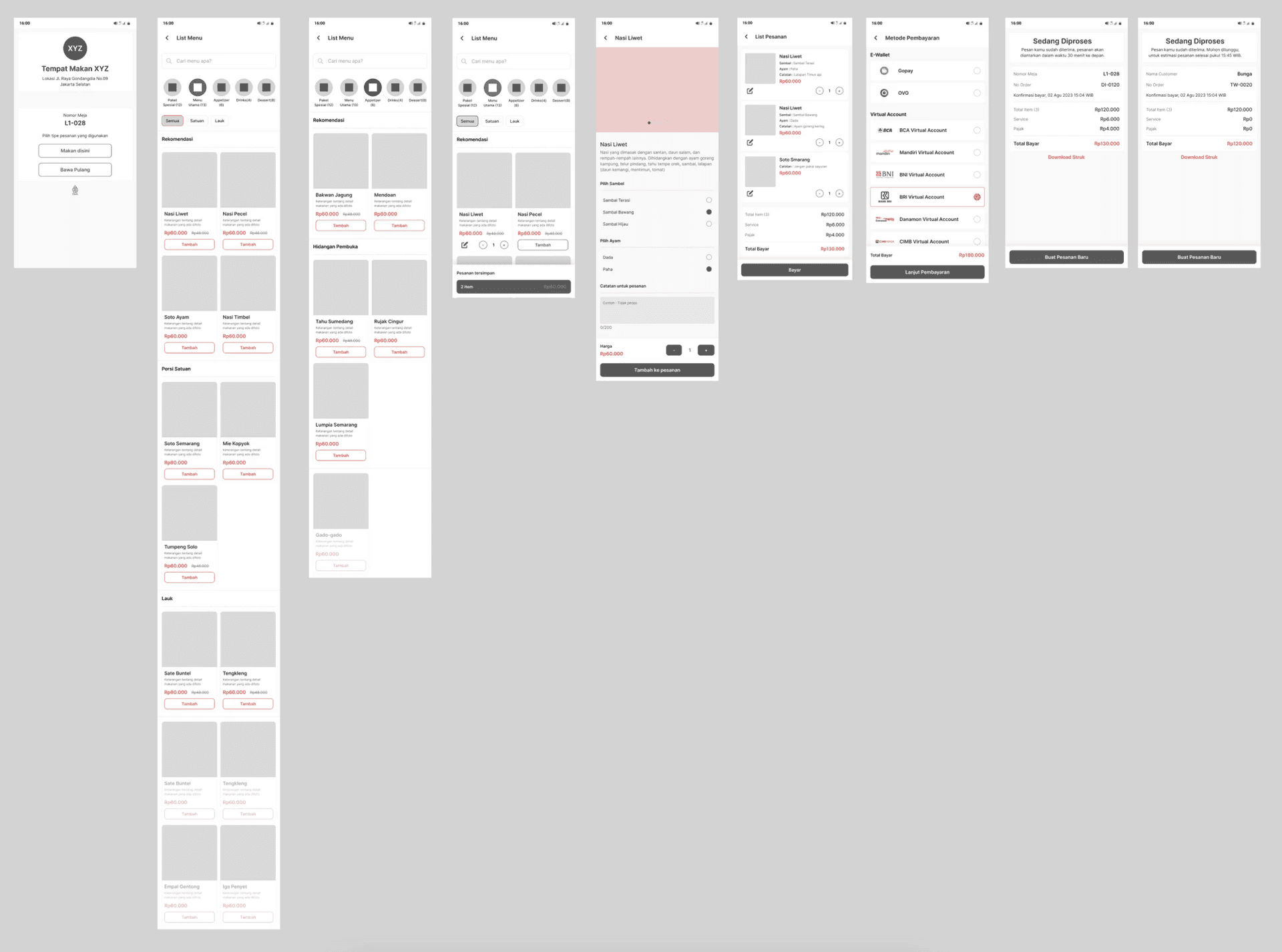
  1. Low Fidelity Design

  1. Design

  1. Low Fidelity Design


  1. Design Sistem


  1. High Fidelity Design


Detail Screen :


  1. Main Screen


  1. List Menu


  1. Detail Menu


  1. Order Cart


  1. Payment Methods


  1. Thankyou Page


Link Figma :

https://www.figma.com/design/hHC2fRV4makAMsYAFWdS79/Siti-Zuliatul-Faidah---Test-Case-Jakmall?node-id=19-2&t=lhoTSA8yi5ZbCOPE-1


Closing :

  1. Collaboration with the Interior Design Team

Based on the ideas presented earlier, several items require collaboration with the Interior Design team (and the company) to optimize the system:


  1. Table Placement

    Table layout needs careful consideration since the QR code system depends heavily on tables. Movement or rearranging of tables should be minimized.

    Other factors include dining behavior, like customers coming in pairs, groups of four, or larger groups that require longer combined tables.

  2. QR Code Placement

    Since the system relies on QR codes, they must be placed in spots that are easy to see and access. They also need to be made of durable material to last longer.

    Additionally, clear guidance should be provided for how to use the QR code.

  3. Table Rules for Dine-in and Takeaway

    To keep the restaurant organized and create a better dining experience, table zoning should be considered—separating dine-in tables from takeaway/online order waiting areas (especially as takeaway orders can be high in volume).

    If a dedicated takeaway section is provided, it reduces disruption to dine-in customers and avoids confusion (e.g., customers waiting around tables during busy hours).


B. Limitations and Suggestions

The proposed ideas still leave some limitations. With further iterations and enough data, these points can be improved in future development.


System Limitations

  1. Since there is no login or account creation, no transaction history will be saved. Customers can only access receipts while the page is still active or if they download the receipt. Once the order is complete and the thank you page is closed, users will lose access to their receipt.

  2. No cash payment support. If demand is high, this can be solved by adding manual cashier payment options.

  3. No credit/debit card support. Currently, only virtual accounts (VA) are available. If needed, this can be solved by combining with payment terminals that support credit and debit cards.

  4. The order system only supports close bill (order and pay immediately).

  5. Since the system relies on QR code scanning, it depends heavily on QR quality. If a QR code is damaged or missing, the transaction may fail.


Test Case Limitation

  • Current testing only covers the customer side. It does not yet include the company side, such as menu management or kitchen operations.


Closing :

  1. Collaboration with the Interior Design Team

Based on the ideas presented earlier, several items require collaboration with the Interior Design team (and the company) to optimize the system:


  1. Table Placement

    Table layout needs careful consideration since the QR code system depends heavily on tables. Movement or rearranging of tables should be minimized.

    Other factors include dining behavior, like customers coming in pairs, groups of four, or larger groups that require longer combined tables.

  2. QR Code Placement

    Since the system relies on QR codes, they must be placed in spots that are easy to see and access. They also need to be made of durable material to last longer.

    Additionally, clear guidance should be provided for how to use the QR code.

  3. Table Rules for Dine-in and Takeaway

    To keep the restaurant organized and create a better dining experience, table zoning should be considered—separating dine-in tables from takeaway/online order waiting areas (especially as takeaway orders can be high in volume).

    If a dedicated takeaway section is provided, it reduces disruption to dine-in customers and avoids confusion (e.g., customers waiting around tables during busy hours).


B. Limitations and Suggestions

The proposed ideas still leave some limitations. With further iterations and enough data, these points can be improved in future development.


System Limitations

  1. Since there is no login or account creation, no transaction history will be saved. Customers can only access receipts while the page is still active or if they download the receipt. Once the order is complete and the thank you page is closed, users will lose access to their receipt.

  2. No cash payment support. If demand is high, this can be solved by adding manual cashier payment options.

  3. No credit/debit card support. Currently, only virtual accounts (VA) are available. If needed, this can be solved by combining with payment terminals that support credit and debit cards.

  4. The order system only supports close bill (order and pay immediately).

  5. Since the system relies on QR code scanning, it depends heavily on QR quality. If a QR code is damaged or missing, the transaction may fail.


Test Case Limitation

  • Current testing only covers the customer side. It does not yet include the company side, such as menu management or kitchen operations.

Create a free website with Framer, the website builder loved by startups, designers and agencies.